Pokazywanie postów oznaczonych etykietą Java. Pokaż wszystkie posty

piątek, września 21, 2018

How Alibaba analyzes production problems

https://github.com/alibaba/arthas


środa, września 05, 2018

OpenID Connect

http://openid.net/connect/faq/
https://connect2id.com/learn/openid-connect
https://developers.google.com/identity/protocols/OpenIDConnect
https://accounts.google.com/.well-known/openid-configuration
https://istio.io/docs/reference/config/istio.authentication.v1alpha1/
https://www.keycloak.org/docs/3.0/server_admin/topics/threat/compromised-tokens.html
https://www.ibm.com/support/knowledgecenter/SSFS6T/com.ibm.apic.toolkit.doc/tutorial_apionprem_security_OAuth.html

wtorek, sierpnia 14, 2018

Changelog for Java Cryptography

https://www.java.com/en/jre-jdk-cryptoroadmap.html

poniedziałek, kwietnia 02, 2018

Spring Framework 5 and Docker


Very soon with shared classes support on OpenJ9 - https://github.com/eclipse/openj9/issues/1244. Now unpack fat jar, delete google collections and run like this:


Please notice that very simple REST service consumes 32MB of disk space. If we have local docker registry it's not a problem. In case we use cloud we can optimize this size creating master docker image with common unpacked libs and then our dockerfile for single application should be derived from this master image. If we need orchestration of Spring applications we should put them inside Docker Swarm's stacks with replica count providing appropriate level of HA - ingress network with own service/name resolving will automagically take care of HA/LB.

Since the hell is frozen you can create Spring 5 application on Linux with Visual Studio Code and push it to Azure as a docker image.


Java - write once, deploy everywhere.


Remark for Eclipse OpenJ9: to control memory settings via environment variables use IBM_JAVA_OPTIONS instead of _JAVA_OPTIONS.

środa, marca 28, 2018

Hot to abuse NVDIMM support in Java 10

Java 10 allows for memory allocation in a place different than plain RAM. The idea was to support Intel Optane and similar things, but we can abuse that feature to run Java applications in compressed memory or in filesystem. Let's play with something small.

Prerequisites:
root@user-Aspire-ES1-431:~# modinfo zram
filename:       /lib/modules/4.14.20-041420-generic/kernel/drivers/block/zram/zram.ko
description:    Compressed RAM Block Device
author:         Nitin Gupta
license:        Dual BSD/GPL
srcversion:     98BCA9B63810EF5DB65BF87
depends:     
retpoline:      Y
intree:         Y
name:           zram
vermagic:       4.14.20-041420-generic SMP mod_unload
signat:         PKCS#7
signer:       
sig_key:     
sig_hashalgo:   md4
parm:           num_devices:Number of pre-created zram devices (uint)
root@user-Aspire-ES1-431:~# modprobe zram num_devices=4
root@user-Aspire-ES1-431:~# echo 1G > /sys/block/zram0/disksize
[ 2562.326469] zram0: detected capacity change from 0 to 1073741824
root@user-Aspire-ES1-431:~# mkfs.ext4 /dev/zram0; mount /dev/zram0 /cmem
mke2fs 1.43.5 (04-Aug-2017)
Discarding device blocks: done                         
Creating filesystem with 262144 4k blocks and 65536 inodes
Filesystem UUID: f8ddae16-ebd4-4615-80c3-8cf60a448526
Superblock backups stored on blocks:
32768, 98304, 163840, 229376

Allocating group tables: done                         
Writing inode tables: done                         
Creating journal (8192 blocks): done
Writing superblocks and filesystem accounting information: done

We see here that even with filesystem and compression overhead solution AllocateHeapAt zram isn't very slow. We can put Java EE into zram and fit the same set of applications using one node instead of two. Very tempting. Maximum heap size is set to 512MB (fake NV) and we still use RAM.


And now killer feature: run Java application in filesystem (/tmp). Why it is not slow? Linux has got very good filesystem cache.


[pid 31442] openat(AT_FDCWD, "/cmem/storage//jvmheap.d3tNHS", O_RDWR|O_CREAT|O_EXCL, 0600) = 4
[pid 31442] unlink("/cmem/storage//jvmheap.d3tNHS" 
[pid 31442] fallocate(4, 0, 0, 536870912 
[pid 31442] mmap(0xe0000000, 536870912, PROT_READ|PROT_WRITE, MAP_SHARED|MAP_FIXED, 4, 0) = 0xe0000000
[pid 31442] close(4)                    = 0

If the name passed to unlink was the last link to a file but any processes still have the file open, the file will remain in existence until the last file descriptor referring to it is closed. Access to nvdimm memory visible as filesystem and allocated via files must be secure. No other process should be able to alter memory file and unlink is used for that together with exclusive file access. The munmap() system call deletes the mappings for the specified address range, and causes further references to addresses within the range to generate invalid memory references. The region is also automatically unmapped when the process is terminated. On the other hand, closing the file descriptor does not unmap the region. It is not possible for any Java thread to access file descriptor of memory file, because this descriptor is gone. Security gives us also good cleanup.

In case heap is mmaped from /tmp we use memory from filesystem buffers - we have swapping at application level, controlled by us, not by the OS which can hit any application. In case of zram we have transparent memory compression.

środa, marca 07, 2018

Dynatrace OneAgent and Tibco

Dynatrace dynamically injects own JMS properties for tracing. Seeing the same identifier on service provider and client association can be deduced.

Tracing HTTP activities inject HTTP header.

Here is traced SOAP WS call.

BW has got a bug of closing ServletOutputStream twice. With some tracing overhead Tomcat is fast enought to recycle buffer before next close() and Dynatrace (without special workaround walks) into NullPointerException.

Thanks to injected tracing Smartscape can draw a network of connections between services.

Tibco is supported with generic HTTP and JMS approach. 


Dyntrace shows us a nice profiling statistics, however it is not aware about Tibco BW process definitions, so we get everything in one bag.


sobota, marca 03, 2018

OpenJ9

https://www.slideshare.net/MarkStoodley/javaone-2017-mark-stoodley-open-sourcing-ibm-j9-jvm

sobota, września 23, 2017

Tibco BusinessWorks on IBM Java 9 with reduced memory consumption thanks to Strings held as byte[] instead of char[]

http://openjdk.java.net/jeps/254

https://www.ibm.com/support/knowledgecenter/SSYKE2_9.0.0/j9vm_reference.html

but...

https://github.com/eclipse/openj9/issues/42 needs some work - default Garbage Collection settings may have impact on some benchmarks and real life loads. Still IBM Metronome GC doesn't have these issues.

To switch Tibco BW to OpenJ9 use these settings in tra:

tibco.env.JVM_LIB_DIR /home/user/TIBCO/tibcojre64/jdk-9+181/lib/j9vm
tibco.env.JVM_LIB_SERVER_DIR /home/user/TIBCO/tibcojre64/jdk-9+181/lib/j9vm
tibco.env.JVM_LIB_PATH /home/user/TIBCO/tibcojre64/jdk-9+181/lib/j9vm/libjvm.so

When switching from Java 7 you have to add sun.io.* to some jar in classpath. Memory usage needs some research and numbers and then we can think of target environments: DEV, TEST. PROD would need support from Tibco.


czwartek, września 21, 2017

OpenJDK from IBM

https://github.com/AdoptOpenJDK/openjdk9-openj9-releases/releases

wtorek, września 19, 2017

Tibco BW and TLSv1.2


wtorek, września 12, 2017

Access SAP from Java


piątek, sierpnia 18, 2017

Kafka 0.11 API can be easily wrapped into JMS API


piątek, czerwca 09, 2017

How to create instance of Java interface returning dummy data


czwartek, maja 18, 2017

Bug in Java(c)?

String lastReturnCode = "WAITING";
Long isSuccessful = ("OK".equals(lastReturnCode) || "DEAD".equals(lastReturnCode)) ? 1L :
 "WAITING".equals(lastReturnCode) ? null : 0L;
System.out.println(isSuccessful);

NullPointerException in the third line. Let's decompile class file.
Long isSuccessful = Long.valueOf((("OK".equals(lastReturnCode)) || ("DEAD".equals(lastReturnCode))) ? 1L : 
(("WAITING".equals(lastReturnCode)) ? null : Long.valueOf(0L))
.longValue());

No proper autoboxing here. Use Long.valueOf(1L) to fix it.

piątek, kwietnia 21, 2017

Messaging of AliExpress

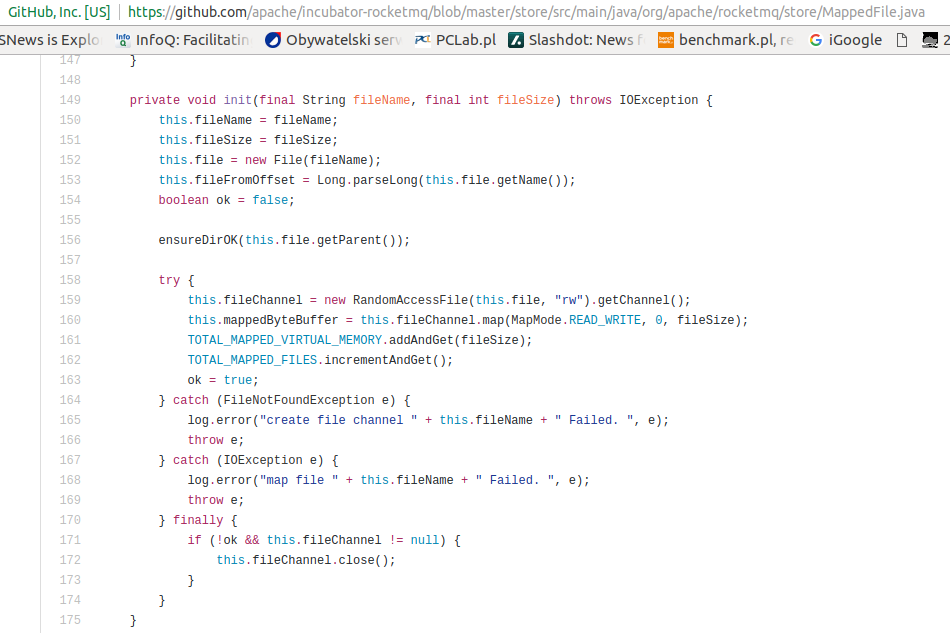
The biggest world global eCommerce - AliExpress has its own messaging and its source code looks interesting especially with claims "Throughout the period, 99.996% of the delay fell within 10ms, very few due to GC caused by the pause in 50ms or less, for the read and write ratio is almost balanced distributed message engine, the results are all exciting." which are about Java software.
With first look following can be spotted: heavy usage of java.util.concurrent, volatile keyword, ByteBuffers and very limited usage of synchronized blocks. File storage uses plain RandomAccessFile with OS-mapped ByteBuffers where everything read and written is with computed offsets. Flushing data to disk is performed in file groups which is very wise due to mechanical sympathy with underlying disks (think about hardware I/O queues and servicing according to given offsets). Memory storage uses direct ByteBuffers not affected by GC and also locked into physical memory with POSIX mlock call. Very smart! I was exploiting the last feature while writing near RealTime software for T-Mobile emergency number. It really helps to achieve low latency without outliers.


środa, lutego 22, 2017

Czy ArrayList jest szybsze od LinkedList? #3

int elements = 2000000;
int tries = 100;
String values[] = new String[elements];
IntStream.range(0, elements).forEach( el -> { values[el]=el+""; } );
  
long t0 = System.currentTimeMillis();
IntStream.range(0, tries).parallel().forEach( i -> {
 ArrayList al = new ArrayList();
 IntStream.range(0, elements).parallel().forEach( j -> { al.add(values[j]); } );
});  
  
long t1= System.currentTimeMillis();
IntStream.range(0, tries).parallel().forEach( i -> {
 LinkedList ll = new LinkedList();
 IntStream.range(0, elements).parallel().forEach( j -> { ll.add(values[j]); } );
});   
  
  
long t2 = System.currentTimeMillis();
System.out.println("Add to ArrayList: "+(t1-t0)/tries+" ms avg, cnt="+elements+", tries="+tries);
System.out.println("Add to LinkedList: "+(t2-t1)/tries+" ms avg, cnt="+elements+", tries="+tries);

--
Add to ArrayList: 18 ms avg, cnt=2000000, tries=100
Add to LinkedList: 77 ms avg, cnt=2000000, tries=100

piątek, lutego 17, 2017

Czy ArrayList jest szybsze od LinkedList? #2

ArrayList al = new ArrayList<>();
for (int j=0; j < elements; j++)
 al.add(new Long(j));
LinkedList ll = new LinkedList<>();
for (int j=0; j < elements; j++)
  ll.add(new Long(j));
int indices[] = new int[elements / 100];
Random r = new Random(19700101);
for (int i=0; i < indices.length; i++) {
 indices[i] = r.nextInt(indices.length);
}
 
t0 = System.currentTimeMillis();
BigDecimal sum = new BigDecimal(0);
for (int i=0; i < indices.length; i++) {
 sum.add( new BigDecimal(al.get(indices[i])) );
}
t1 = System.currentTimeMillis();
sum = new BigDecimal(0);
for (int i=0; i < indices.length; i++) {
 sum.add( new BigDecimal(ll.get(indices[i])) );
}
t2 = System.currentTimeMillis();
  
System.out.println("Access ArrayList: "+(t1-t0)+" ms, cnt="+elements+", tries="+indices.length);
System.out.println("Access LinkedList: "+(t2-t1)+" ms, cnt="+elements+", tries="+indices.length);

--
Access ArrayList: 12 ms, cnt=2000000, tries=20000
Access LinkedList: 371 ms, cnt=2000000, tries=20000

Czy ArrayList jest szybsze od LinkedList?

int elements = 1000000;
int tries = 100;
String values[] = new String[elements];
for (int k=0; k < elements; k++) {
 values[k] = String.valueOf(k).intern();
}
  
long t0 = System.currentTimeMillis();
for (int i=0; i < tries; i++) {
 ArrayList al = new ArrayList();
 for (int j=0; j < elements; j++)
  al.add(values[j]);
}
  
long t1= System.currentTimeMillis();
for (int i=0; i < tries; i++) {
 LinkedList ll = new LinkedList();
 for (int j=0; j < elements; j++)
  ll.add(values[j]);
}
  
long t2 = System.currentTimeMillis();
System.out.println("Add to ArrayList: "+(t1-t0)/100+" ms avg, cnt="+elements+", tries="+tries);
System.out.println("Add to LinkedList: "+(t2-t1)/100+" ms avg, cnt="+elements+", tries="+tries);
--
Add to ArrayList: 33 ms avg, cnt=2000000, tries=100
Add to LinkedList: 51 ms avg, cnt=2000000, tries=100

Add to ArrayList: 18 ms avg, cnt=1000000, tries=100
Add to LinkedList: 12 ms avg, cnt=1000000, tries=100

czwartek, września 17, 2015

Percentiles in HSQLDB

create AGGREGATE FUNCTION PERCENTILES(IN val float, IN flag_return boolean, INOUT buffer float ARRAY, INOUT counter INT)
   RETURNS varchar2
   CONTAINS SQL
   BEGIN ATOMIC
     declare i number default 1;
     declare stats varchar2(2000) default '';
     declare asum float default 0;  
     declare p0, p50, p90, p99, p100, pavg number default 0;
     declare sorted_buffer float ARRAY;
     IF flag_return THEN
       --call println('PERCENTILES return');
       set sorted_buffer = SORT_ARRAY(buffer);  
       call println('PERCENTILES sorted');
       set p50 = sorted_buffer[1];
       set p90 = sorted_buffer[1];
       set p99 = sorted_buffer[1];
       while i <= counter do
       begin atomic
  --call println('PERCENTILES selection '||i);
           set asum = asum + sorted_buffer[i];
           if abs(i - round(counter / 2, 0)) < 0.001 then
               set p50 = round(sorted_buffer[i], 2);
           end if;        
           if abs(i - round(counter * 9 / 10, 0)) < 0.001 then
               set p90 = round(sorted_buffer[i], 2);
           end if;
           if abs(i - round(counter  * 99 / 100, 0)) < 0.001 then
               set p99 = round(sorted_buffer[i], 2);
           end if;
  set i = i+1;        
       end;
       end while;
       set p0 = round(sorted_buffer[1],2);
       set p100 = round(sorted_buffer[counter],2);
       set pavg = round(asum / counter, 2);
       --call println('PERCENTILES preparing result');
       set stats = 'min='|| p0 || '|p50='|| p50 || '|p90='||p90 || '|p99='||p99 || '|max='||p100 || '|avg='|| pavg;
       RETURN stats;
     ELSE      
       IF val IS NULL THEN RETURN NULL; END IF;
       IF counter IS NULL THEN SET counter = 0; END IF;
       SET counter = counter + 1;
       IF counter = 1 THEN SET buffer = ARRAY[val];
       ELSE SET buffer[counter] = val; END IF;
       RETURN NULL;
     END IF;
   END

for (select appid, percentiles(mem_pct) as mem_stats, avg(mem_mb) as mem,
percentiles(cpu_pct) as cpu_stats, avg(cpu_cnt) as cpu,
    percentiles(gc_millis) as gc_stats from T_VM_STAT group by appid) do
  begin atomic
set r = REGEXP_SUBSTRING_ARRAY(mem_stats, '((?<==)[0-9]+[\.\,]*[0-9]*)');
set (p0,p50,p90,p99,p100,pavg)=(to_number(r[1]), to_number(r[2]), to_number(r[3]), to_number(r[4]), to_number(r[5]), to_number(r[6]));

wtorek, stycznia 20, 2015

Replace XML element content with regexp

replaceAll
<([a-zA-Z]+[0-9]*:)?([^\s<]*[eE]lement[^\s]*)([^>]*>)([^<]*)(<\/\1\2)
<$1$2$3fixedContent$5