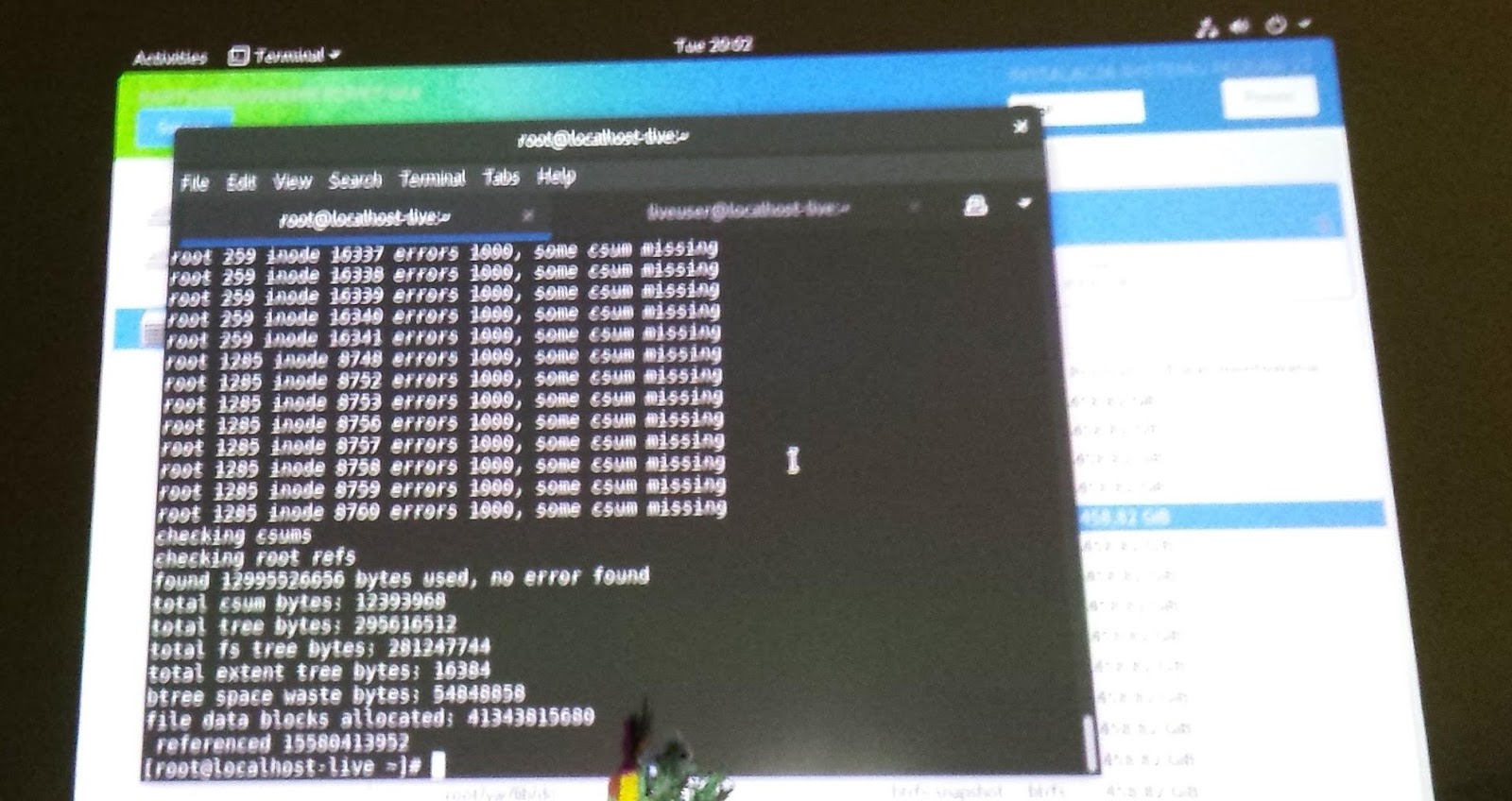
This is a story about btrfs and docker build server. Decomissioned hardware with AMD Phenom X4 was brought to life again after Intel Spectre/Meltdown bugs, however problem of not tightly installed RAM modules went unnoticed. Electrical connection between pins was not reliable and from time to time headless server was crashing due to corrupted memory. After cold restart it was working again. Until it was loaded with building docker images. Once ssh failed with I/O error from filesystem and after warm reboot server was dead. After attaching display it was visible that boot process crashed early on btrfs open_ctree_failed.
OK, there is initrd with btrfsck. Let's try btrfsck --repair. According to output there is a disaster.
Let's check what else we have with this tool: -b use the first valid backup root copy. Command line tool did something, but after --repair rerun still nothing. Assessment of situation: brtfs seriously damaged, no backup since it was simple server for building docker images. Nothing important was on disks, everything important was pushed to the cloud. Reinstall Linux, now with ZFS? OK, booting USB installer. Next, next, hmm - installer sees btrfs volumes. How is it possible? Running dmesg. Kernel sees partition, tries to reply transactions but fails with checksums.
OK, now: btrfsck --repair -b --init-csum-tree. Waiting....
Mounting. Now kernel fails with extents. How about: btrfsck --repair -b --init-csum-tree --init-extent-tree?
After many minutes fsck finishes and I'm able to mount fs read write. Listing content and there is /root and /home. Reboot and server is fully operational!
Filesystem is probably rock solid, but fsck is written this way that it totally doesn't help people to recover filesystem.
Pokazywanie postów oznaczonych etykietą Linux. Pokaż wszystkie posty
piątek, kwietnia 13, 2018
sobota, lutego 24, 2018
czwartek, stycznia 25, 2018
Ubuntu 17.10 window buttons like in Unity
gsettings set org.gnome.desktop.wm.preferences button-layout 'close,minimize,maximize:'
poniedziałek, września 04, 2017
Why /etc/security/limits.conf doesn't work in Ubuntu 16.04, 16.10, 17.04?
Because there is systemd...
Modify its files:
root@user-VirtualBox:~# grep NOFILE /etc/systemd/*.conf
/etc/systemd/system.conf:DefaultLimitNOFILE=2097152
/etc/systemd/user.conf:DefaultLimitNOFILE=1048576
Modify its files:
root@user-VirtualBox:~# grep NOFILE /etc/systemd/*.conf
/etc/systemd/system.conf:DefaultLimitNOFILE=2097152
/etc/systemd/user.conf:DefaultLimitNOFILE=1048576
środa, czerwca 28, 2017
poniedziałek, czerwca 26, 2017
czwartek, października 27, 2016
Fix slow and unresponsive LibreOffice in Ubuntu 16.10
echo "export SAL_USE_VCLPLUGIN=gtk" >> /etc/profile
czwartek, października 20, 2016
Johny Mnemonic - Memory Doubler
cat /etc/default/grub | grep zswap
GRUB_CMDLINE_LINUX_DEFAULT="splash quiet zswap.enabled=1 zswap.max_pool_percent=50"
https://www.ibm.com/developerworks/community/blogs/fe313521-2e95-46f2-817d-44a4f27eba32/entry/new_linux_zswap_compression_functionality7?lang=en
GRUB_CMDLINE_LINUX_DEFAULT="splash quiet zswap.enabled=1 zswap.max_pool_percent=50"
https://www.ibm.com/developerworks/community/blogs/fe313521-2e95-46f2-817d-44a4f27eba32/entry/new_linux_zswap_compression_functionality7?lang=en
środa, czerwca 24, 2015
How to make Tibco BW Designer less ugly on Linux
Install Microsoft web fonts and set these used by Designer to Arial 12 and Lucida Typewriter 12.
Modify designer.tra:
java.extended.properties -XX:+UseG1GC -XX:MaxGCPauseMillis=100 -XX:MaxPermSize=512m -Dswing.defaultlaf=com.jgoodies.looks.plastic.Plastic3DLookAndFeel -Dawt.useSystemAAFontSettings=lcd -Dsun.java2d.opengl=false -Dswing.aatext=true
Modify designer.tra:
java.extended.properties -XX:+UseG1GC -XX:MaxGCPauseMillis=100 -XX:MaxPermSize=512m -Dswing.defaultlaf=com.jgoodies.looks.plastic.Plastic3DLookAndFeel -Dawt.useSystemAAFontSettings=lcd -Dsun.java2d.opengl=false -Dswing.aatext=true
piątek, maja 15, 2015
czwartek, lutego 19, 2015
wtorek, lutego 10, 2015
Fix 'No space left on device' with btrfs
Add new disk. Then: btrfs device add /dev/sdd /. And it's fixed.
piątek, grudnia 12, 2014
Executable Linux shared library
#include <stdlib.h>
#include <stdio.h>
#include <unistd.h>
const char interp[] __attribute__((section(".interp"))) = "/lib64/ld-linux-x86-64.so.2";
void test() {
printf("test\r\n");
}
extern "C" void _main(int argc, char **argv) {
printf("main\r\n");
test();
exit(0);
}
user@user-Aspire-4530 ~/DEV $ g++ -shared -fPIC -o libtest.so libtest.c -Wl,-e,_main
user@user-Aspire-4530 ~/DEV $ LD_PRELOAD=./libtest.so ls
libtest.c libtest.o libtest.so
user@user-Aspire-4530 ~/DEV $ ./libtest.so
main
test
user@user-Aspire-4530 ~/DEV $ readelf -l /bin/ls | grep interpreter
środa, sierpnia 13, 2014
Bardzo ładny Linux
ElementaryOS. Ładne czcionki, ładne kolory, kontrasty. Menedżer plików pamięta ostatnią lokalizację.
poniedziałek, czerwca 16, 2014
How to check number of threads per Tibco BW instance
ps -efT | grep tibco | awk '{print $13}' > /tmp/all-proc.txt; for f in `ps -efT | grep tibco | awk '{print $13}' | sort -u`; do echo $f; grep -c $f /tmp/all-proc.txt; done
poniedziałek, grudnia 09, 2013
Kernel 3.8.13 od Oracle-a dla RHEL 6.5
http://public-yum.oracle.com/public-yum-ol6.repo
http://public-yum.oracle.com/repo/OracleLinux/OL6/UEKR3/latest/x86_64/
Btrfs send-receive wreszcie dostępne.
http://public-yum.oracle.com/repo/OracleLinux/OL6/UEKR3/latest/x86_64/
Btrfs send-receive wreszcie dostępne.
Ubuntu 13.10 sleep vs hibernation
vi /etc/pm/config.d/00-use-suspend-hybrid
--Insert--
if [ "$METHOD" = "suspend" ]; then
METHOD="hibernate"
fi
HIBERNATE_MODE=suspend
SLEEP_MODULE=uswsusp
PM_HIBERNATE_DELAY=210
HIBERNATE_RESUME_POST_VIDEO=yes
vi /etc/polkit-1/localauthority/50-local.d/com.ubuntu.enable-hibernate.pkla
--Edit--
[Re-enable hibernate by default]
Identity=unix-user:*
Action=org.freedesktop.upower.hibernate
ResultActive=yes
--Insert--
if [ "$METHOD" = "suspend" ]; then
METHOD="hibernate"
fi
HIBERNATE_MODE=suspend
SLEEP_MODULE=uswsusp
PM_HIBERNATE_DELAY=210
HIBERNATE_RESUME_POST_VIDEO=yes
vi /etc/polkit-1/localauthority/50-local.d/com.ubuntu.enable-hibernate.pkla
--Edit--
[Re-enable hibernate by default]
Identity=unix-user:*
Action=org.freedesktop.upower.hibernate
ResultActive=yes
piątek, sierpnia 02, 2013
Tweaked DRBD
resource ems-store-01 {
startup {
become-primary-on both;
}
net {
protocol C;
allow-two-primaries yes;
verify-alg sha1;
data-integrity-alg sha1;
csums-alg md5;
connect-int 20;
ping-int 15;
timeout 100;
cram-hmac-alg sha1;
shared-secret passw0rd;
max-buffers 8000;
max-epoch-size 8000;
after-sb-0pri discard-zero-changes;
after-sb-1pri consensus;
after-sb-2pri disconnect;
}
disk {
on-io-error pass_on;
fencing dont-care;
al-extents 6000;
}
...
}
scheduler = deadline, front_merges = 0, read_expire = 150, write_expire = 1500
startup {
become-primary-on both;
}
net {
protocol C;
allow-two-primaries yes;
verify-alg sha1;
data-integrity-alg sha1;
csums-alg md5;
connect-int 20;
ping-int 15;
timeout 100;
cram-hmac-alg sha1;
shared-secret passw0rd;
max-buffers 8000;
max-epoch-size 8000;
after-sb-0pri discard-zero-changes;
after-sb-1pri consensus;
after-sb-2pri disconnect;
}
disk {
on-io-error pass_on;
fencing dont-care;
al-extents 6000;
}
...
}
scheduler = deadline, front_merges = 0, read_expire = 150, write_expire = 1500
środa, lipca 31, 2013
No protocol specified, Could not initialize class sun.awt.X11.XToolkit [Oracle install via VNC]
Do not run vncserver as a root, a don't do 'su oracle'. Start VNC sever as a plain user, start runInstaller within his VNC session.
wtorek, lipca 30, 2013
Simulate long distance data center connection
[root@eai-node-01 ~]# modprobe sch_netem; tc qdisc add dev bond0 root netem delay 10ms 5ms 25%
[root@eai-node-01 ~]# ping eai-node-02.local
PING eai-node-02.local (192.168.100.202) 56(84) bytes of data.
64 bytes from eai-node-02.local (192.168.100.202): icmp_seq=1 ttl=64 time=14.5 ms
64 bytes from eai-node-02.local (192.168.100.202): icmp_seq=2 ttl=64 time=11.6 ms
64 bytes from eai-node-02.local (192.168.100.202): icmp_seq=3 ttl=64 time=9.37 ms
64 bytes from eai-node-02.local (192.168.100.202): icmp_seq=4 ttl=64 time=14.5 ms
64 bytes from eai-node-02.local (192.168.100.202): icmp_seq=5 ttl=64 time=14.8 ms
64 bytes from eai-node-02.local (192.168.100.202): icmp_seq=6 ttl=64 time=14.0 ms
64 bytes from eai-node-02.local (192.168.100.202): icmp_seq=7 ttl=64 time=13.9 ms
64 bytes from eai-node-02.local (192.168.100.202): icmp_seq=8 ttl=64 time=11.7 ms
64 bytes from eai-node-02.local (192.168.100.202): icmp_seq=9 ttl=64 time=11.3 ms
64 bytes from eai-node-02.local (192.168.100.202): icmp_seq=10 ttl=64 time=10.1 ms
64 bytes from eai-node-02.local (192.168.100.202): icmp_seq=11 ttl=64 time=7.36 ms
64 bytes from eai-node-02.local (192.168.100.202): icmp_seq=12 ttl=64 time=6.50 ms
64 bytes from eai-node-02.local (192.168.100.202): icmp_seq=13 ttl=64 time=7.04 ms
64 bytes from eai-node-02.local (192.168.100.202): icmp_seq=14 ttl=64 time=9.13 ms
64 bytes from eai-node-02.local (192.168.100.202): icmp_seq=15 ttl=64 time=14.0 ms
64 bytes from eai-node-02.local (192.168.100.202): icmp_seq=16 ttl=64 time=9.01 ms
64 bytes from eai-node-02.local (192.168.100.202): icmp_seq=17 ttl=64 time=6.72 ms
64 bytes from eai-node-02.local (192.168.100.202): icmp_seq=18 ttl=64 time=9.01 ms
64 bytes from eai-node-02.local (192.168.100.202): icmp_seq=19 ttl=64 time=9.53 ms
^C
--- eai-node-02.local ping statistics ---
53 packets transmitted, 53 received, 0% packet loss, time 52133ms
rtt min/avg/max/mdev = 5.188/10.388/14.837/2.724 ms
[root@eai-node-01 ~]# tc qdisc del root dev bond0
[root@eai-node-01 ~]# tc qdisc
qdisc mq 0: dev eth0 root
qdisc mq 0: dev eth1 root
[root@eai-node-01 ~]# ping eai-node-02.local
PING eai-node-02.local (192.168.100.202) 56(84) bytes of data.
64 bytes from eai-node-02.local (192.168.100.202): icmp_seq=1 ttl=64 time=0.161 ms
64 bytes from eai-node-02.local (192.168.100.202): icmp_seq=2 ttl=64 time=0.172 ms
64 bytes from eai-node-02.local (192.168.100.202): icmp_seq=3 ttl=64 time=0.139 ms
64 bytes from eai-node-02.local (192.168.100.202): icmp_seq=4 ttl=64 time=0.145 ms
64 bytes from eai-node-02.local (192.168.100.202): icmp_seq=5 ttl=64 time=0.162 ms
64 bytes from eai-node-02.local (192.168.100.202): icmp_seq=6 ttl=64 time=0.133 ms
^C
--- eai-node-02.local ping statistics ---
6 packets transmitted, 6 received, 0% packet loss, time 5983ms
rtt min/avg/max/mdev = 0.133/0.152/0.172/0.013 ms
[root@eai-node-01 ~]# tc qdisc add dev bond0 root netem loss 30% 25%
[root@eai-node-01 ~]# ping eai-node-02.local
PING eai-node-02.local (192.168.100.202) 56(84) bytes of data.
64 bytes from eai-node-02.local (192.168.100.202): icmp_seq=1 ttl=64 time=0.157 ms
64 bytes from eai-node-02.local (192.168.100.202): icmp_seq=2 ttl=64 time=0.138 ms
64 bytes from eai-node-02.local (192.168.100.202): icmp_seq=3 ttl=64 time=0.204 ms
64 bytes from eai-node-02.local (192.168.100.202): icmp_seq=4 ttl=64 time=0.174 ms
[root@eai-node-01 ~]# tc qdisc del root dev bond0
[root@eai-node-01 ~]# tc qdisc add dev bond0 root netem delay 10ms reorder 25% 50%
[root@eai-node-01 ~]# ping eai-node-02.local
PING eai-node-02.local (192.168.100.202) 56(84) bytes of data.
64 bytes from eai-node-02.local (192.168.100.202): icmp_seq=1 ttl=64 time=10.2 ms
64 bytes from eai-node-02.local (192.168.100.202): icmp_seq=2 ttl=64 time=10.2 ms
64 bytes from eai-node-02.local (192.168.100.202): icmp_seq=3 ttl=64 time=0.153 ms
64 bytes from eai-node-02.local (192.168.100.202): icmp_seq=4 ttl=64 time=10.1 ms
64 bytes from eai-node-02.local (192.168.100.202): icmp_seq=5 ttl=64 time=7.88 ms
64 bytes from eai-node-02.local (192.168.100.202): icmp_seq=6 ttl=64 time=10.1 ms
64 bytes from eai-node-02.local (192.168.100.202): icmp_seq=7 ttl=64 time=10.2 ms
[root@eai-node-02 ~]# modprobe ifb
[root@eai-node-02 ~]# ip link set dev ifb0 up
[root@eai-node-02 ~]# tc qdisc add dev bond0 ingress
[root@eai-node-02 ~]# tc filter add dev bond0 parent ffff: protocol ip u32 match ip dport 7789 0xffff flowid 1:1 action mirred egress redirect dev ifb0
Action 4 device ifb0 ifindex 5
[root@eai-node-02 ~]# tc qdisc add dev ifb0 root netem delay 7ms
[root@eai-node-01 ~]# ping eai-node-02.local
PING eai-node-02.local (192.168.100.202) 56(84) bytes of data.
64 bytes from eai-node-02.local (192.168.100.202): icmp_seq=1 ttl=64 time=14.5 ms
64 bytes from eai-node-02.local (192.168.100.202): icmp_seq=2 ttl=64 time=11.6 ms
64 bytes from eai-node-02.local (192.168.100.202): icmp_seq=3 ttl=64 time=9.37 ms
64 bytes from eai-node-02.local (192.168.100.202): icmp_seq=4 ttl=64 time=14.5 ms
64 bytes from eai-node-02.local (192.168.100.202): icmp_seq=5 ttl=64 time=14.8 ms
64 bytes from eai-node-02.local (192.168.100.202): icmp_seq=6 ttl=64 time=14.0 ms
64 bytes from eai-node-02.local (192.168.100.202): icmp_seq=7 ttl=64 time=13.9 ms
64 bytes from eai-node-02.local (192.168.100.202): icmp_seq=8 ttl=64 time=11.7 ms
64 bytes from eai-node-02.local (192.168.100.202): icmp_seq=9 ttl=64 time=11.3 ms
64 bytes from eai-node-02.local (192.168.100.202): icmp_seq=10 ttl=64 time=10.1 ms
64 bytes from eai-node-02.local (192.168.100.202): icmp_seq=11 ttl=64 time=7.36 ms
64 bytes from eai-node-02.local (192.168.100.202): icmp_seq=12 ttl=64 time=6.50 ms
64 bytes from eai-node-02.local (192.168.100.202): icmp_seq=13 ttl=64 time=7.04 ms
64 bytes from eai-node-02.local (192.168.100.202): icmp_seq=14 ttl=64 time=9.13 ms
64 bytes from eai-node-02.local (192.168.100.202): icmp_seq=15 ttl=64 time=14.0 ms
64 bytes from eai-node-02.local (192.168.100.202): icmp_seq=16 ttl=64 time=9.01 ms
64 bytes from eai-node-02.local (192.168.100.202): icmp_seq=17 ttl=64 time=6.72 ms
64 bytes from eai-node-02.local (192.168.100.202): icmp_seq=18 ttl=64 time=9.01 ms
64 bytes from eai-node-02.local (192.168.100.202): icmp_seq=19 ttl=64 time=9.53 ms
^C
--- eai-node-02.local ping statistics ---
53 packets transmitted, 53 received, 0% packet loss, time 52133ms
rtt min/avg/max/mdev = 5.188/10.388/14.837/2.724 ms
[root@eai-node-01 ~]# tc qdisc del root dev bond0
[root@eai-node-01 ~]# tc qdisc
qdisc mq 0: dev eth0 root
qdisc mq 0: dev eth1 root
[root@eai-node-01 ~]# ping eai-node-02.local
PING eai-node-02.local (192.168.100.202) 56(84) bytes of data.
64 bytes from eai-node-02.local (192.168.100.202): icmp_seq=1 ttl=64 time=0.161 ms
64 bytes from eai-node-02.local (192.168.100.202): icmp_seq=2 ttl=64 time=0.172 ms
64 bytes from eai-node-02.local (192.168.100.202): icmp_seq=3 ttl=64 time=0.139 ms
64 bytes from eai-node-02.local (192.168.100.202): icmp_seq=4 ttl=64 time=0.145 ms
64 bytes from eai-node-02.local (192.168.100.202): icmp_seq=5 ttl=64 time=0.162 ms
64 bytes from eai-node-02.local (192.168.100.202): icmp_seq=6 ttl=64 time=0.133 ms
^C
--- eai-node-02.local ping statistics ---
6 packets transmitted, 6 received, 0% packet loss, time 5983ms
rtt min/avg/max/mdev = 0.133/0.152/0.172/0.013 ms
[root@eai-node-01 ~]# tc qdisc add dev bond0 root netem loss 30% 25%
[root@eai-node-01 ~]# ping eai-node-02.local
PING eai-node-02.local (192.168.100.202) 56(84) bytes of data.
64 bytes from eai-node-02.local (192.168.100.202): icmp_seq=1 ttl=64 time=0.157 ms
64 bytes from eai-node-02.local (192.168.100.202): icmp_seq=2 ttl=64 time=0.138 ms
64 bytes from eai-node-02.local (192.168.100.202): icmp_seq=3 ttl=64 time=0.204 ms
64 bytes from eai-node-02.local (192.168.100.202): icmp_seq=4 ttl=64 time=0.174 ms
[root@eai-node-01 ~]# tc qdisc del root dev bond0
[root@eai-node-01 ~]# tc qdisc add dev bond0 root netem delay 10ms reorder 25% 50%
[root@eai-node-01 ~]# ping eai-node-02.local
PING eai-node-02.local (192.168.100.202) 56(84) bytes of data.
64 bytes from eai-node-02.local (192.168.100.202): icmp_seq=1 ttl=64 time=10.2 ms
64 bytes from eai-node-02.local (192.168.100.202): icmp_seq=2 ttl=64 time=10.2 ms
64 bytes from eai-node-02.local (192.168.100.202): icmp_seq=3 ttl=64 time=0.153 ms
64 bytes from eai-node-02.local (192.168.100.202): icmp_seq=4 ttl=64 time=10.1 ms
64 bytes from eai-node-02.local (192.168.100.202): icmp_seq=5 ttl=64 time=7.88 ms
64 bytes from eai-node-02.local (192.168.100.202): icmp_seq=6 ttl=64 time=10.1 ms
64 bytes from eai-node-02.local (192.168.100.202): icmp_seq=7 ttl=64 time=10.2 ms
[root@eai-node-02 ~]# modprobe ifb
[root@eai-node-02 ~]# ip link set dev ifb0 up
[root@eai-node-02 ~]# tc qdisc add dev bond0 ingress
[root@eai-node-02 ~]# tc filter add dev bond0 parent ffff: protocol ip u32 match ip dport 7789 0xffff flowid 1:1 action mirred egress redirect dev ifb0
Action 4 device ifb0 ifindex 5
[root@eai-node-02 ~]# tc qdisc add dev ifb0 root netem delay 7ms
Subskrybuj:
Posty (Atom)