tibemsd.conf:
flow_control=enabled
per queue:
expiration=180min
flowControl=100MB
maxbytes=300MB
maxmsgs=100000
overflowPolicy=discardOld
Pokazywanie postów oznaczonych etykietą Tibco. Pokaż wszystkie posty
Pokazywanie postów oznaczonych etykietą Tibco. Pokaż wszystkie posty
czwartek, maja 17, 2018

piątek, maja 04, 2018
EMS HA properties for BW
Defines the name of the System Property controlling the number of attempts the connections make to connect to the server. When too many clients connect to the same server, the server may not be able to accept all connections at the same time. This parameter specifies the number of attempts and delay between the attempt the connections perform in order to connect to the server. The value of this property is a String in the form "NN[,DELAY]" where NN is the number of attempts and DELAY is delay in milliseconds between the attempts. Minimum value of NN is 1, minimum value of DELAY is 250 milliseconds. Default value used is "2,500".
java.property.tibco.tibjms.connect.attempts 999999999,1000
java.property.tibco.tibjms.connect.attempt.timeout 10000
Defines the name of the System Property controlling the number of attempt the connections make to reconnect to the backup server during the fault-tolerant switch. This property is similar to PROP_CONNECT_ATTEMPTS. The difference is that it may be necessary to use different parameters during reconnect than during the initial connect. Initial connect of the clients to the server is normally distributed in time and there are less chances of the server exceeding its maximum accept queue. During fault-tolerant switch, all connected clients automatically try to reconnect to the backup server, approximately at the same time. When the number of connections is large, it may require more attempts to reconnect than the initial connect. The value of this property is a String in the form "NN[,DELAY]" where NN is the number of attempts and DELAY is delay in milliseconds between the attempts. Minimum value of NN is 1, minimum value of DELAY is 250 ms. Default value used is "4,500".
java.property.tibco.tibjms.reconnect.attempts 999999999,1000
java.property.tibco.tibjms.reconnect.attempt.timeout 10000
Defines the name of the System Property setting the ping interval for inactive connections.
When a connection does not send nor receives any data, it may not be able to detect network failure
in certain situations. To avoid this, inactive connections periodically send "ping" messages to the server. Default interval is 60 seconds. In some cases it may take several intervals to detect network failure. The value of this property is a string encoding the ping interval in seconds, e.g. "60".
Zero value disables ping messages.
java.property.tibco.tibjms.ping.interval=10
java.property.tibco.tibjms.connect.attempts 999999999,1000
java.property.tibco.tibjms.connect.attempt.timeout 10000
Defines the name of the System Property controlling the number of attempt the connections make to reconnect to the backup server during the fault-tolerant switch. This property is similar to PROP_CONNECT_ATTEMPTS. The difference is that it may be necessary to use different parameters during reconnect than during the initial connect. Initial connect of the clients to the server is normally distributed in time and there are less chances of the server exceeding its maximum accept queue. During fault-tolerant switch, all connected clients automatically try to reconnect to the backup server, approximately at the same time. When the number of connections is large, it may require more attempts to reconnect than the initial connect. The value of this property is a String in the form "NN[,DELAY]" where NN is the number of attempts and DELAY is delay in milliseconds between the attempts. Minimum value of NN is 1, minimum value of DELAY is 250 ms. Default value used is "4,500".
java.property.tibco.tibjms.reconnect.attempts 999999999,1000
java.property.tibco.tibjms.reconnect.attempt.timeout 10000
Defines the name of the System Property setting the ping interval for inactive connections.
When a connection does not send nor receives any data, it may not be able to detect network failure
in certain situations. To avoid this, inactive connections periodically send "ping" messages to the server. Default interval is 60 seconds. In some cases it may take several intervals to detect network failure. The value of this property is a string encoding the ping interval in seconds, e.g. "60".
Zero value disables ping messages.
java.property.tibco.tibjms.ping.interval=10
piątek, kwietnia 06, 2018
Tibco BusinessWorks 5 in Docker is very simple
[builder@box opt]# docker build -t "tibco/eaistack" .
Sending build context to Docker daemon 581.7MB
Step 1/9 : FROM adoptopenjdk/openjdk9-openj9:jdk-9.181
---> f5e644bfbf5e
Step 2/9 : MAINTAINER Tibco Developer tibco.developer@company.com
---> Using cache
---> f72e93d7d0bf
Step 3/9 : ENV PROJECT Project
---> Running in 1162b66a8ff7
Removing intermediate container 1162b66a8ff7
---> bc4dc5f91389
Step 4/9 : RUN useradd -c 'Tibco user' -m -d /opt/tibco -s /bin/bash tibco
---> Running in aadb73ea6fce
Removing intermediate container aadb73ea6fce
---> cfa3f370c3ea
Step 5/9 : COPY tibco /opt/tibco
---> f755316e4ab5
Step 6/9 : RUN chown -R tibco:tibco /opt/tibco
---> Running in ceeca78eff6e
Removing intermediate container ceeca78eff6e
---> 7df870209be9
Step 7/9 : USER tibco
---> Running in a87922428472
Removing intermediate container a87922428472
---> 45581051bfd7
Step 8/9 : ENV HOME /opt/tibco
---> Running in 9cc9a18712a1
Removing intermediate container 9cc9a18712a1
---> fe1eb6c10268
Step 9/9 : ENTRYPOINT cd /opt/tibco/bw/5.13/bin; ./bwengine /opt/tibco/$PROJECT
---> Running in 646514a92838
Removing intermediate container 646514a92838
---> b5eaf0052739
Successfully built b5eaf0052739
Successfully tagged tibco/eaistack:latest
[builder@box opt]#
[builder@box opt]# docker run -i -t tibco/eaistack
Using work space directory /opt/tibco/bw/5.13/bin/working/5b987d721310
Creating trace file /opt/tibco/bw/5.13/bin/logs/5b987d721310.log
Using XMLReader org.apache.xerces.jaxp.SAXParserImpl$JAXPSAXParser
2018 Apr 05 21:28:16:375 GMT +0000 BW.5b987d721310 Info [BW-Core] BWENGINE-300001 Process Engine version 5.13.0, build V24, 2015-8-11
2018 Apr 05 21:28:16:423 GMT +0000 BW.5b987d721310 Info [BW-Core] BWENGINE-300009 BW Plugins: version 5.13.0, build V24, 2015-8-11
2018 Apr 05 21:28:16:433 GMT +0000 BW.5b987d721310 Info [BW-Core] BWENGINE-300010 XML Support: TIBCOXML Version 5.60.0.003
2018 Apr 05 21:28:16:433 GMT +0000 BW.5b987d721310 Info [BW-Core] BWENGINE-300011 Java version: Eclipse OpenJ9 VM 2.9
2018 Apr 05 21:28:16:434 GMT +0000 BW.5b987d721310 Info [BW-Core] BWENGINE-300012 OS version: amd64 Linux 4.15.14-300.fc27.x86_64
2018 Apr 05 21:28:18:770 GMT +0000 BW.5b987d721310 Info [BW-Core] BWENGINE-300013 Tibrv string encoding: UTF-8
creating file: /opt/tibco/bw/5.13/bin/working/5b987d721310/internal/nextJobidBlock
2018 Apr 05 21:28:19:514 GMT +0000 BW.5b987d721310 Info [BW-Core] BWENGINE-300002 Engine 5b987d721310 started
2018 Apr 05 21:28:19:777 GMT +0000 BW.5b987d721310 User [BW-User] - Job-1 [Entrypoint.process/Log]: BW Engine works fine
2018 Apr 05 21:28:19:784 GMT +0000 BW.5b987d721310 Info [BW-Core] BWENGINE-300014 Starting delayed shutdown, max-delay=[0], wait-for-checkpoints=[false]
2018 Apr 05 21:28:19:787 GMT +0000 BW.5b987d721310 Debug [BW-Core] Shutdown max timeout exceeded, 0 jobs still running
job dispatcher with 8 threads, max queued = 1
2018 Apr 05 21:28:19:791 GMT +0000 BW.5b987d721310 Info [BW-Core] BWENGINE-300006 Engine 5b987d721310 terminating
[builder@box opt]#
[builder@box bw-time]# docker build -t tibco/bw-time .
Sending build context to Docker daemon 49.66kB
Step 1/5 : FROM tibco/eaistack:latest
---> b5eaf0052739
Step 2/5 : MAINTAINER Tibco Developer tibco.developer@company.com
---> Running in 249c3146f07c
Removing intermediate container 249c3146f07c
---> c275aa789efb
Step 3/5 : COPY BW-HTTP-Time /opt/tibco/projects/BW-HTTP-Time
---> a4aa2d95814e
Step 4/5 : ENV PROJECT projects/BW-HTTP-Time
---> Running in 7f65638aaab0
Removing intermediate container 7f65638aaab0
---> 4783982bc9ae
Step 5/5 : EXPOSE 8080
---> Running in 433e6a02617d
Removing intermediate container 433e6a02617d
---> a02dc0366ab0
Successfully built a02dc0366ab0
Successfully tagged tibco/bw-time:latest
[builder@box bw-time]#
[builder@box bw-time]# docker run -d -p 8090:8080 tibco/bw-time
[builder@box bw-time]# curl http://localhost:8090
Sending build context to Docker daemon 581.7MB
Step 1/9 : FROM adoptopenjdk/openjdk9-openj9:jdk-9.181
---> f5e644bfbf5e
Step 2/9 : MAINTAINER Tibco Developer tibco.developer@company.com
---> Using cache
---> f72e93d7d0bf
Step 3/9 : ENV PROJECT Project
---> Running in 1162b66a8ff7
Removing intermediate container 1162b66a8ff7
---> bc4dc5f91389
Step 4/9 : RUN useradd -c 'Tibco user' -m -d /opt/tibco -s /bin/bash tibco
---> Running in aadb73ea6fce
Removing intermediate container aadb73ea6fce
---> cfa3f370c3ea
Step 5/9 : COPY tibco /opt/tibco
---> f755316e4ab5
Step 6/9 : RUN chown -R tibco:tibco /opt/tibco
---> Running in ceeca78eff6e
Removing intermediate container ceeca78eff6e
---> 7df870209be9
Step 7/9 : USER tibco
---> Running in a87922428472
Removing intermediate container a87922428472
---> 45581051bfd7
Step 8/9 : ENV HOME /opt/tibco
---> Running in 9cc9a18712a1
Removing intermediate container 9cc9a18712a1
---> fe1eb6c10268
Step 9/9 : ENTRYPOINT cd /opt/tibco/bw/5.13/bin; ./bwengine /opt/tibco/$PROJECT
---> Running in 646514a92838
Removing intermediate container 646514a92838
---> b5eaf0052739
Successfully built b5eaf0052739
Successfully tagged tibco/eaistack:latest
[builder@box opt]#
[builder@box opt]# docker run -i -t tibco/eaistack
Using work space directory /opt/tibco/bw/5.13/bin/working/5b987d721310
Creating trace file /opt/tibco/bw/5.13/bin/logs/5b987d721310.log
Using XMLReader org.apache.xerces.jaxp.SAXParserImpl$JAXPSAXParser
2018 Apr 05 21:28:16:375 GMT +0000 BW.5b987d721310 Info [BW-Core] BWENGINE-300001 Process Engine version 5.13.0, build V24, 2015-8-11
2018 Apr 05 21:28:16:423 GMT +0000 BW.5b987d721310 Info [BW-Core] BWENGINE-300009 BW Plugins: version 5.13.0, build V24, 2015-8-11
2018 Apr 05 21:28:16:433 GMT +0000 BW.5b987d721310 Info [BW-Core] BWENGINE-300010 XML Support: TIBCOXML Version 5.60.0.003
2018 Apr 05 21:28:16:433 GMT +0000 BW.5b987d721310 Info [BW-Core] BWENGINE-300011 Java version: Eclipse OpenJ9 VM 2.9
2018 Apr 05 21:28:16:434 GMT +0000 BW.5b987d721310 Info [BW-Core] BWENGINE-300012 OS version: amd64 Linux 4.15.14-300.fc27.x86_64
2018 Apr 05 21:28:18:770 GMT +0000 BW.5b987d721310 Info [BW-Core] BWENGINE-300013 Tibrv string encoding: UTF-8
creating file: /opt/tibco/bw/5.13/bin/working/5b987d721310/internal/nextJobidBlock
2018 Apr 05 21:28:19:514 GMT +0000 BW.5b987d721310 Info [BW-Core] BWENGINE-300002 Engine 5b987d721310 started
2018 Apr 05 21:28:19:777 GMT +0000 BW.5b987d721310 User [BW-User] - Job-1 [Entrypoint.process/Log]: BW Engine works fine
2018 Apr 05 21:28:19:784 GMT +0000 BW.5b987d721310 Info [BW-Core] BWENGINE-300014 Starting delayed shutdown, max-delay=[0], wait-for-checkpoints=[false]
2018 Apr 05 21:28:19:787 GMT +0000 BW.5b987d721310 Debug [BW-Core] Shutdown max timeout exceeded, 0 jobs still running
job dispatcher with 8 threads, max queued = 1
2018 Apr 05 21:28:19:791 GMT +0000 BW.5b987d721310 Info [BW-Core] BWENGINE-300006 Engine 5b987d721310 terminating
[builder@box opt]#
[builder@box bw-time]# docker build -t tibco/bw-time .
Sending build context to Docker daemon 49.66kB
Step 1/5 : FROM tibco/eaistack:latest
---> b5eaf0052739
Step 2/5 : MAINTAINER Tibco Developer tibco.developer@company.com
---> Running in 249c3146f07c
Removing intermediate container 249c3146f07c
---> c275aa789efb
Step 3/5 : COPY BW-HTTP-Time /opt/tibco/projects/BW-HTTP-Time
---> a4aa2d95814e
Step 4/5 : ENV PROJECT projects/BW-HTTP-Time
---> Running in 7f65638aaab0
Removing intermediate container 7f65638aaab0
---> 4783982bc9ae
Step 5/5 : EXPOSE 8080
---> Running in 433e6a02617d
Removing intermediate container 433e6a02617d
---> a02dc0366ab0
Successfully built a02dc0366ab0
Successfully tagged tibco/bw-time:latest
[builder@box bw-time]#
[builder@box bw-time]# docker run -d -p 8090:8080 tibco/bw-time
[builder@box bw-time]# curl http://localhost:8090
Current dateTime is 2018-04-05T22:05:55.22Z
środa, marca 07, 2018
Dynatrace OneAgent and Tibco
 |
| Dynatrace dynamically injects own JMS properties for tracing. Seeing the same identifier on service provider and client association can be deduced. |
 |
| Tracing HTTP activities inject HTTP header. |
 |
| Here is traced SOAP WS call. |
 |
| BW has got a bug of closing ServletOutputStream twice. With some tracing overhead Tomcat is fast enought to recycle buffer before next close() and Dynatrace (without special workaround walks) into NullPointerException. |
 |
| Thanks to injected tracing Smartscape can draw a network of connections between services. |
 |
| Tibco is supported with generic HTTP and JMS approach. |

 |
| Dyntrace shows us a nice profiling statistics, however it is not aware about Tibco BW process definitions, so we get everything in one bag. |


poniedziałek, lutego 26, 2018
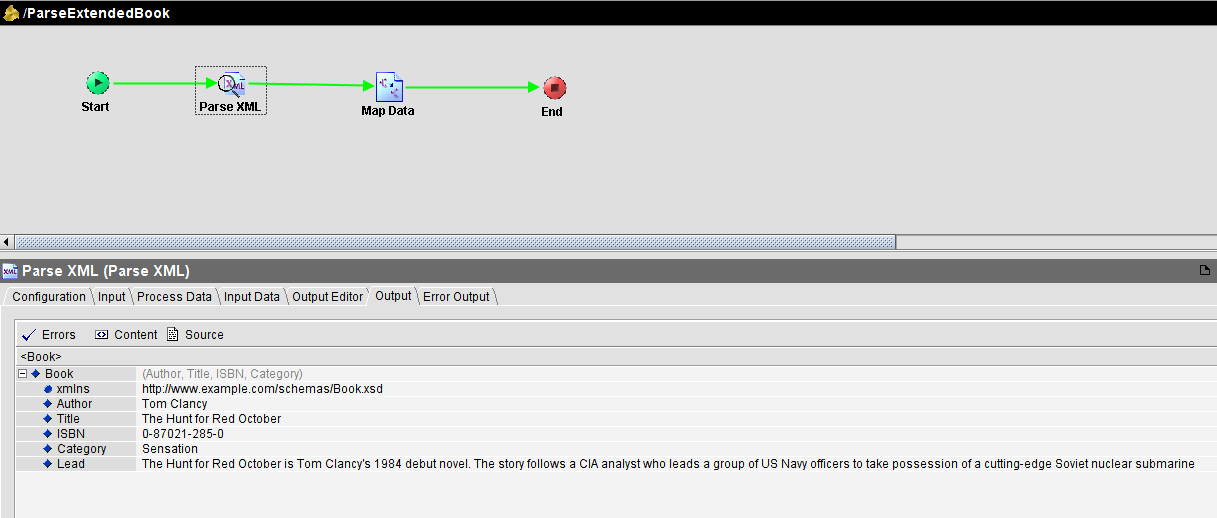
Continuosly updated CDM entities BW pattern
With one (or more) publisher(s) of CDM entity and many subscribers a single change in canonical data model forces all subscribers to adjust. With smart approach on BW side done once no furter adjustment is needed:
Parse XML string retrieved from transport against selected XSD entity but with input validation disabled. In next step map this data using for-each - designer proposes currently known fields/elements. In case data format is changed and new fields are added to the end of sequence they will be parsed but will be omitted in mapper. We still have data validation in mapper, but only on known (as of development) fields.


Parse XML string retrieved from transport against selected XSD entity but with input validation disabled. In next step map this data using for-each - designer proposes currently known fields/elements. In case data format is changed and new fields are added to the end of sequence they will be parsed but will be omitted in mapper. We still have data validation in mapper, but only on known (as of development) fields.

czwartek, lutego 22, 2018
How to output compressed data with HTTP in Tibco BW

środa, stycznia 17, 2018

poniedziałek, stycznia 08, 2018
Bridges and slow consumer
Here what happens when we bridge standard communication to one slowly consumed topic: data store grows and becomes fragmented causing additional delay in EMS processing. It will be especially visible in SAP request-reply activities:


niedziela, stycznia 07, 2018
Understanding Tibco BW Checkpoint
BW Checkpoint activity writes BW JobData to disk or database. In case BW process is killed engine can read file or database entry and resume from saved JobData. When BW process finishes checkpoint data is deleted. It is important to understand function of this activity. It helps to preserve input volatile data and prevent duplicates. Please notice that pattern JMS Queue Receive + Send used with acknowledge mode = Client produces duplicates. Acknowledge mode local transactional works only in simple scenarios and cannot be applied to every possible combination of BW activities. Transactional JMS processing in BW is possible with XA, however XA is buggy. So the simplest pattern to prevent duplicates in 99% is checkpoint.
When you process important data in BW and target system is not idempotent, you cannot pass duplicates.
Let's get back to Checkpoint activity. It can be implemented with filesystem or database. In case of high volume of concurrent large messages database is under heavy load with clob data: "INSERT INTO $table(job_id, engine_name, job_data) VALUES (?,?,?)". However to prevent duplicates in active-active deployment database is the only option to not lock data in failed BW instance. What about file implementation? It uses FileOutputStream with close() and without OS fsync() via FileChannel.force(). Java close() method does not call underlying OS close() immediately but only via Java finalizer. Only force() gives strong consistency guaranty: If this channel's file resides on a local storage device then when this method returns it is guaranteed that all changes made to the file since this channel was created, or since this method was last invoked, will have been written to that device. This is useful for ensuring that critical information is not lost in the event of a system crash. There is engine property bw.engine.checkpoint.file.besteffortsync causing 2 phase checkpointing (save to file and rename). Please check Tibco Support knowledge base:
BW 5.3.3 hf14, BW 5.6.1
1-8H96WT
An empty checkpoint data file was created if the system crashed or
shutdown abruptly while checkpoint data was being written to the
file. It may result in messages being lost. This is fixed by
introducing a new engine property,
'bw.engine.checkpoint.file.besteffortsync'. By default, the property
is set to false. Setting this property to true addresses the problem,
but introduces a performance delay.
In Linux file memory buffers are flushed to disk every 5 seconds. Please consult https://www.kernel.org/doc/Documentation/sysctl/vm.txt:
dirty_writeback_centisecs
The kernel flusher threads will periodically wake up and write `old' data
out to disk. This tunable expresses the interval between those wakeups, in
100'ths of a second.
Setting this to zero disables periodic writeback altogether.
BW jobs which end sooner that 5s from checkpoint do not write to disk any data. Long running processes write files using Linux IO scheduler optimizations (deadline, cfq). To summarize: BW file checkpoint on Linux is not a serious performance problem when used wisely.
When you process important data in BW and target system is not idempotent, you cannot pass duplicates.
Let's get back to Checkpoint activity. It can be implemented with filesystem or database. In case of high volume of concurrent large messages database is under heavy load with clob data: "INSERT INTO $table(job_id, engine_name, job_data) VALUES (?,?,?)". However to prevent duplicates in active-active deployment database is the only option to not lock data in failed BW instance. What about file implementation? It uses FileOutputStream with close() and without OS fsync() via FileChannel.force(). Java close() method does not call underlying OS close() immediately but only via Java finalizer. Only force() gives strong consistency guaranty: If this channel's file resides on a local storage device then when this method returns it is guaranteed that all changes made to the file since this channel was created, or since this method was last invoked, will have been written to that device. This is useful for ensuring that critical information is not lost in the event of a system crash. There is engine property bw.engine.checkpoint.file.besteffortsync causing 2 phase checkpointing (save to file and rename). Please check Tibco Support knowledge base:
BW 5.3.3 hf14, BW 5.6.1
1-8H96WT
An empty checkpoint data file was created if the system crashed or
shutdown abruptly while checkpoint data was being written to the
file. It may result in messages being lost. This is fixed by
introducing a new engine property,
'bw.engine.checkpoint.file.besteffortsync'. By default, the property
is set to false. Setting this property to true addresses the problem,
but introduces a performance delay.
In Linux file memory buffers are flushed to disk every 5 seconds. Please consult https://www.kernel.org/doc/Documentation/sysctl/vm.txt:
dirty_writeback_centisecs
The kernel flusher threads will periodically wake up and write `old' data
out to disk. This tunable expresses the interval between those wakeups, in
100'ths of a second.
Setting this to zero disables periodic writeback altogether.
BW jobs which end sooner that 5s from checkpoint do not write to disk any data. Long running processes write files using Linux IO scheduler optimizations (deadline, cfq). To summarize: BW file checkpoint on Linux is not a serious performance problem when used wisely.
poniedziałek, grudnia 18, 2017
Modern Tibco monitoring with JMX, Prometheus and Grafana


{
  "annotations": {
    "list": [
      {
        "builtIn": 1,
        "datasource": "-- Grafana --",
        "enable": true,
        "hide": true,
        "iconColor": "rgba(0, 211, 255, 1)",
        "name": "Annotations & Alerts",
        "type": "dashboard"
      }
    ]
  },
  "editable": true,
  "gnetId": null,
  "graphTooltip": 0,
  "hideControls": false,
  "id": 9,
  "links": [],
  "refresh": false,
  "rows": [
    {
      "collapse": false,
      "height": 507,
      "panels": [
        {
          "aliasColors": {},
          "bars": false,
          "dashLength": 10,
          "dashes": false,
          "datasource": null,
          "description": "$bw_apps",
          "fill": 1,
          "id": 1,
          "legend": {
            "alignAsTable": true,
            "avg": false,
            "current": true,
            "max": false,
            "min": false,
            "show": true,
            "sortDesc": false,
            "total": false,
            "values": true
          },
          "lines": true,
          "linewidth": 1,
          "links": [],
          "nullPointMode": "null",
          "percentage": false,
          "pointradius": 5,
          "points": false,
          "renderer": "flot",
          "repeat": "bw_apps",
          "scopedVars": {
            "bw_apps": {
              "selected": true,
              "text": "TRA|BWPublicationService-1.tra",
              "value": "TRA|BWPublicationService-1.tra"
            }
          },
          "seriesOverrides": [],
          "spaceLength": 10,
          "span": 12,
          "stack": false,
          "steppedLine": false,
          "targets": [
            {
              "expr": "Bw_createdJobs{component=~\"$bw_apps\",job=~\"tibco-bw-prod.*\"}",
              "format": "time_series",
              "instant": false,
              "interval": "",
              "intervalFactor": 2,
              "legendFormat": "Created on {{host}} > {{object}}",
              "metric": "Bw_createdJobs",
              "refId": "A",
              "step": 120
            },
            {
              "expr": "Bw_completedJobs{component=~\"$bw_apps\",job=~\"tibco-bw-prod.*\"}",
              "format": "time_series",
              "intervalFactor": 2,
              "legendFormat": "Completed on {{host}} > {{object}}",
              "metric": "Bw_completedJobs",
              "refId": "B",
              "step": 120
            },
            {
              "expr": "Bw_abortedJobs{component=~\"$bw_apps\",job=~\"tibco-bw-prod.*\"}",
              "format": "time_series",
              "intervalFactor": 2,
              "legendFormat": "Aborted on {{host}} > {{object}}",
              "metric": "Bw_abortedJobs",
              "refId": "C",
              "step": 120
            },
            {
              "expr": "Bw_inFlightJobs{component=~\"$bw_apps\",job=~\"tibco-bw-prod.*\"}",
              "format": "time_series",
              "intervalFactor": 2,
              "legendFormat": "Waiting on {{host}} > {{object}}",
              "metric": "Bw_inFlightJobs",
              "refId": "D",
              "step": 120
            },
            {
              "expr": "Bw_hasErrors{component=~\"$bw_apps\",job=~\"tibco-bw-prod.*\"}",
              "format": "time_series",
              "intervalFactor": 2,
              "legendFormat": "Errors on {{host}} > {{object}}",
              "metric": "Bw_hasErrors",
              "refId": "E",
              "step": 120
            }
          ],
          "thresholds": [],
          "timeFrom": null,
          "timeShift": null,
          "title": "$bw_apps",
          "tooltip": {
            "shared": true,
            "sort": 0,
            "value_type": "individual"
          },
          "type": "graph",
          "xaxis": {
            "buckets": null,
            "mode": "time",
            "name": null,
            "show": true,
            "values": []
          },
          "yaxes": [
            {
              "format": "short",
              "label": null,
              "logBase": 1,
              "max": null,
              "min": null,
              "show": true
            },
            {
              "format": "short",
              "label": null,
              "logBase": 1,
              "max": null,
              "min": null,
              "show": true
            }
          ]
        }
      ],
      "repeat": null,
      "repeatIteration": null,
      "repeatRowId": null,
      "showTitle": false,
      "title": "Dashboard Row",
      "titleSize": "h6"
    }
  ],
  "schemaVersion": 14,
  "style": "dark",
  "tags": [],
  "templating": {
    "list": [
      {
        "allValue": null,
        "current": {
          "text": "TRA|BWPublicationService-1.tra",
          "value": [
            "TRA|BWPublicationService-1.tra"
          ]
        },
        "datasource": "PrometheusBwMonitoring",
        "hide": 0,
        "includeAll": true,
        "label": null,
        "multi": true,
        "name": "bw_apps",
        "options": [],
        "query": "label_values(Bw_cores,component)",
        "refresh": 1,
        "regex": "TRA.*|BW.*",
        "sort": 1,
        "tagValuesQuery": "",
        "tags": [],
        "tagsQuery": "",
        "type": "query",
        "useTags": false
      }
    ]
  },
  "time": {
    "from": "now-30d",
    "to": "now"
  },
  "timepicker": {
    "refresh_intervals": [
      "5s",
      "10s",
      "30s",
      "1m",
      "5m",
      "15m",
      "30m",
      "1h",
      "2h",
      "1d"
    ],
    "time_options": [
      "5m",
      "15m",
      "1h",
      "6h",
      "12h",
      "24h",
      "2d",
      "7d",
      "30d"
    ]
  },
  "timezone": "browser",
  "title": "BW Jobs",
  "version": 7
}

Tibco Designer on Linux
java.extended.properties -Dswing.defaultlaf=com.jgoodies.looks.plastic.Plastic3DLookAndFeel -Dsun.awt.disablegrab=true --add-opens=java.base/jdk.internal=ALL-UNNAMED --add-opens=java.management/sun.management=ALL-UNNAMED --add-opens=java.management/com.sun.jmx.remote.internal=ALL-UNNAMED --add-opens=java.rmi/sun.rmi.transport=ALL-UNNAMED --add-opens=java.base/jdk.internal.vm=ALL-UNNAMED --add-modules=java.xml.bind --illegal-access=permit -Dswing.defaultlaf=com.jgoodies.looks.plastic.Plastic3DLookAndFeel -Dsun.awt.disablegrab=true -Xscmx1g -Xshareclasses:name=bw -Xgcpolicy:metronome -Djdk.attach.allowAttachSelf=true -Xquickstart
-XX:+IdleTuningGcOnIdle -Xtune:virtualized
export _JAVA_AWT_WM_NONREPARENTING=1
sobota, grudnia 16, 2017
Java 9 for BW 5.x
Eclipse OpenJ9 is a Open Source JDK donated by IBM. It's a enterprise level JVM. Tibco BusinessWorks 5.12 shipped with Java 7.0 and 5.13 with Java 8. Java 7 nowadays has got problems with cryptography/security: HTTPS/TLS and SSH implementations are rejected by remote peers. Why? Because security is a state. It is not absolute. New bugs are found every day and countermeasures must be stronger and stronger. This causes situations where Tibco BW cannot communicate with remote business services. How to fix this? BW supports JVM in a configurable way, both Sun/Oracle and IBM implementations. We can switch Java to Eclipse OpenJ9. Advantages? Up to date security of Java 9. Low memory footprint. Fast startup time. High application throughput. Java Updater for Tibco is here. You should unpack tgz file and run getjdk.sh. If you don't have access to shell try building EAR, deploying and starting.
Usual disclaimer: THE SOFTWARE IS PROVIDED "AS IS", WITHOUT WARRANTY OF ANY KIND, EXPRESS OR IMPLIED, INCLUDING BUT NOT LIMITED TO THE WARRANTIES OF MERCHANTABILITY, FITNESS FOR A PARTICULAR PURPOSE AND NONINFRINGEMENT. IN NO EVENT SHALL THE AUTHORS OR COPYRIGHT HOLDERS BE LIABLE FOR ANY CLAIM, DAMAGES OR OTHER LIABILITY, WHETHER IN AN ACTION OF CONTRACT, TORT OR OTHERWISE, ARISING FROM, OUT OF OR IN CONNECTION WITH THE SOFTWARE OR THE USE OR OTHER DEALINGS IN THE SOFTWARE.


Usual disclaimer: THE SOFTWARE IS PROVIDED "AS IS", WITHOUT WARRANTY OF ANY KIND, EXPRESS OR IMPLIED, INCLUDING BUT NOT LIMITED TO THE WARRANTIES OF MERCHANTABILITY, FITNESS FOR A PARTICULAR PURPOSE AND NONINFRINGEMENT. IN NO EVENT SHALL THE AUTHORS OR COPYRIGHT HOLDERS BE LIABLE FOR ANY CLAIM, DAMAGES OR OTHER LIABILITY, WHETHER IN AN ACTION OF CONTRACT, TORT OR OTHERWISE, ARISING FROM, OUT OF OR IN CONNECTION WITH THE SOFTWARE OR THE USE OR OTHER DEALINGS IN THE SOFTWARE.


wtorek, października 24, 2017

wtorek, października 17, 2017
What is the overhead of Java reflection in Tibco BW?
Let's create 2 processes: one with 2 plain Java measurement activities using System.nanoTime() (Run1) and one with mapper between them (Run1). When we substract nano times we measure time between: output from Java activity, transition, input to Java activity - which would be the same as combined Java execution. Now, time Run2 - Run1 is overhead of Java reflection over simple mapper activity. Let's measure with many repetitions. On Intel Core i7-6820HQ 2.7GHz overhead is below 0.2ms.


środa, października 04, 2017
Parallel transitions in BW 5

In Tibco Designer we can draw parallel transitions, but how are they executed? In parallel? The answer is: no, not quite. Let's create a simple process printing to console Thread.currentThread()+"@"+System.currentTimeMillis() before and after calling HTTP request reply and put it 9 times in different transitions. We see that all activities before HTTP are executed sequentially by the same JobCourier thread and all activities after HTTP are executed by another thread from JobPool, the same for all 9 calls. Please notice that HTTP call is not performed inline. It is executed by dedicated thread pool different than Engine.ThreadCount pool. After the work is queued the process is suspended and its JobCourier is returned to the pool. When HTTP is done Engine seeks for the first unused (round robin) JobCourier thread and resumes main process. Dedicated thread pool is the place where multithreading is utilized.

Let's try to replace HTTP call with plain Sleep, parameterized with integer from 1 to 1000. We see that Sleep in not performed inline. Thread is taken away from process and then returned. Even Sleep(1ms) causes thread switch.

sobota, września 23, 2017
Tibco BusinessWorks on IBM Java 9 with reduced memory consumption thanks to Strings held as byte[] instead of char[]
http://openjdk.java.net/jeps/254
https://www.ibm.com/support/knowledgecenter/SSYKE2_9.0.0/j9vm_reference.html
but...
https://github.com/eclipse/openj9/issues/42 needs some work - default Garbage Collection settings may have impact on some benchmarks and real life loads. Still IBM Metronome GC doesn't have these issues.
To switch Tibco BW to OpenJ9 use these settings in tra:
tibco.env.JVM_LIB_DIR /home/user/TIBCO/tibcojre64/jdk-9+181/lib/j9vm
tibco.env.JVM_LIB_SERVER_DIR /home/user/TIBCO/tibcojre64/jdk-9+181/lib/j9vm
tibco.env.JVM_LIB_PATH /home/user/TIBCO/tibcojre64/jdk-9+181/lib/j9vm/libjvm.so
When switching from Java 7 you have to add sun.io.* to some jar in classpath. Memory usage needs some research and numbers and then we can think of target environments: DEV, TEST. PROD would need support from Tibco.


https://www.ibm.com/support/knowledgecenter/SSYKE2_9.0.0/j9vm_reference.html
but...
https://github.com/eclipse/openj9/issues/42 needs some work - default Garbage Collection settings may have impact on some benchmarks and real life loads. Still IBM Metronome GC doesn't have these issues.
To switch Tibco BW to OpenJ9 use these settings in tra:
tibco.env.JVM_LIB_DIR /home/user/TIBCO/tibcojre64/jdk-9+181/lib/j9vm
tibco.env.JVM_LIB_SERVER_DIR /home/user/TIBCO/tibcojre64/jdk-9+181/lib/j9vm
tibco.env.JVM_LIB_PATH /home/user/TIBCO/tibcojre64/jdk-9+181/lib/j9vm/libjvm.so
When switching from Java 7 you have to add sun.io.* to some jar in classpath. Memory usage needs some research and numbers and then we can think of target environments: DEV, TEST. PROD would need support from Tibco.


czwartek, września 21, 2017
Speed up Tibco Designer Swing UI with GC tuning
java.extended.properties -XX:+PrintGCDetails -XX:+PrintGCDateStamps -XX:+PrintGCTimeStamps -XX:MinHeapFreeRatio=40 -XX:MaxHeapFreeRatio=70 -XX:+UseConcMarkSweepGC -Xmx2048m -Xms1024m -Dawt.useSystemAAFontSettings=lcd -Dsun.java2d.opengl=true -Dswing.aatext=true -Dswing.defaultlaf=com.jgoodies.looks.plastic.Plastic3DLookAndFeel
What is the cause of Tibco BusinessWorks problems with HTTPS (TLSv1.1, TLSv1.2, SalesForce)
Tibco uses old version of cryptographic library Entrust which uses even older library IAIK from Technische Universität Graz in Austria. These are not capable of providing TLSv1.2. IAIK is properly developed and maintained (with TLS supported at least since 2014), see http://jcewww.iaik.tu-graz.ac.at/index.php/sic/News/iSaSiLk_5.0_with_TLS_1.2_support_released, but Tibco doesn't update this library on its own. If you set java.property.TIBCO_SECURITY_VENDOR="j2se" or "j2se-default" or "ibm" in bwengine.tra file (also in designer.tra) you can use security stack from JRE. To be honest only part of it due to strange implementation of Tibco SSL Socket Factory. SSLContext is acquired for hardcoded value "TLSv1", what causes limiting TLS version used to TLSv1 despite the fact that Java 7+ can use TLSv1.2. How can Tibco fix this hardcode bug? By reading private MAX field from Sun's ProtocolVersion and then using it in argument to SSLContext.getInstance(). How can we hack this Tibco bug? By manually setting supported protocols inside JRE SSL contexts. If you want to access SalesForce from BW, but you can't, you can contact me and ask for help.


czwartek, sierpnia 03, 2017


wtorek, sierpnia 01, 2017


Subskrybuj:
Posty (Atom)

